 @pan93412
Zeabur OSS 0.3.0 is out, following 0.2.0.
Zeabur shuts down on December 31, 2026. This release is about moving your services to a server you own and keeping the way you deploy and manage them. If you come from Coolify, Dokploy or Railway, the same path works for you. For the full list of changes, read the v0.3.0 release notes.
What's new
- Paste a prompt into Claude Code or Codex, and it installs or upgrades Zeabur OSS for you, or moves your services and data off Zeabur.
- On a fresh Linux server, Zeatend sets up Kubernetes, and one
helm installgives you Zeabur OSS over HTTPS. - Zeabur Desktop opens any of your clusters from your own computer, with nothing installed in the cluster.
- The template list picks up the latest templates from Zeabur Catalog without an upgrade.
- You can now change database backup settings after you turn backups on.
Let an agent do it: install, move, upgrade
You can now hand installing, moving and upgrading to a coding agent such as Claude Code or Codex. Each task has a prompt ready to paste. The agent then follows the docs step by step, and it stops to ask you before anything that costs money, needs your decision or changes the server.
Move
The tedious part of a move is recreating each service, copying the data and switching DNS. On your own computer, paste this into the agent:
Read https://oss.zeabur.com/docs/zeabur/get-started/from-zeabur-com.md and move my services off Zeabur onto my own server, managed by Zeabur OSS.The agent follows Coming from Zeabur:
- It lists your projects, services, environment variables, databases and domains on Zeabur, and exports the data.
- It suggests a server, with the plan, region and monthly price.
- It sets up Kubernetes on the new server with Zeatend, then installs Zeabur OSS with one
helm install. - It recreates each service in Zeabur OSS, restores the databases and volumes, and tests each one at its
sslip.ioaddress. - Only after you agree, it cuts over, stops the services on Zeabur and syncs the data one last time.
The agent waits for you to pay, create your passkey, and decide when to cut over and change DNS. Before each write to the new cluster, it shows you what will change.
Install
If you have nothing to move yet and just want Zeabur OSS on a server, paste this:
Install Zeabur OSS on my server by following https://oss.zeabur.com/docs/zeabur/install/one-command.md.If the server already runs Kubernetes, follow https://oss.zeabur.com/docs/zeabur/install/existing-cluster.md instead.Before each change to the server, tell me what you will do and wait for my yes. Give me the link that creates the admin account, and don't open it yourself.The agent checks the server, sets up Kubernetes with Zeatend if there is none, installs Zeabur OSS with one helm install, and gives you the address and the link that creates the admin account. For details, read Let an agent install for you.
Upgrade
The cluster page tells you when a new version is out. To upgrade, paste this:
Upgrade Zeabur OSS on my server to the latest version by following https://oss.zeabur.com/docs/zeabur/upgrade/steps.md.The agent finds out how you installed Zeabur OSS, reads the upgrade notes of every version in between, and lists what it will change first. You take the snapshot before the upgrade and sign in with your passkey to check the result after it; the agent stops and waits for you at those steps.
Start from an empty server
You can also do it yourself. Get a Linux server with a public IP and set up Kubernetes with Zeatend. zeatend plan checks the server and lists what it will install before anything happens. Then one helm install installs Zeabur OSS together with Zeabur Identity, which handles sign-in.
You don't need a domain yet. Zeabur OSS starts with an address like zeabur.<ip>.sslip.io and gets a Let's Encrypt certificate for it, so it opens over HTTPS right away. When the install finishes, it prints the link that creates the first admin account, who signs in with a passkey.
The server can be small. In testing, a server with 1 vCPU and 2 GiB of memory still had about 850 MiB free after the install, enough for a small app deployed from a prebuilt image. For the steps, read Install with Zeatend.
Zeabur Desktop, nothing to install
Already have a Kubernetes cluster and just want to see what runs in it? Zeabur Desktop lists the clusters in the kubeconfig on your computer. Pick one, and it opens Zeabur OSS in a new window, with nothing to install in the cluster first.
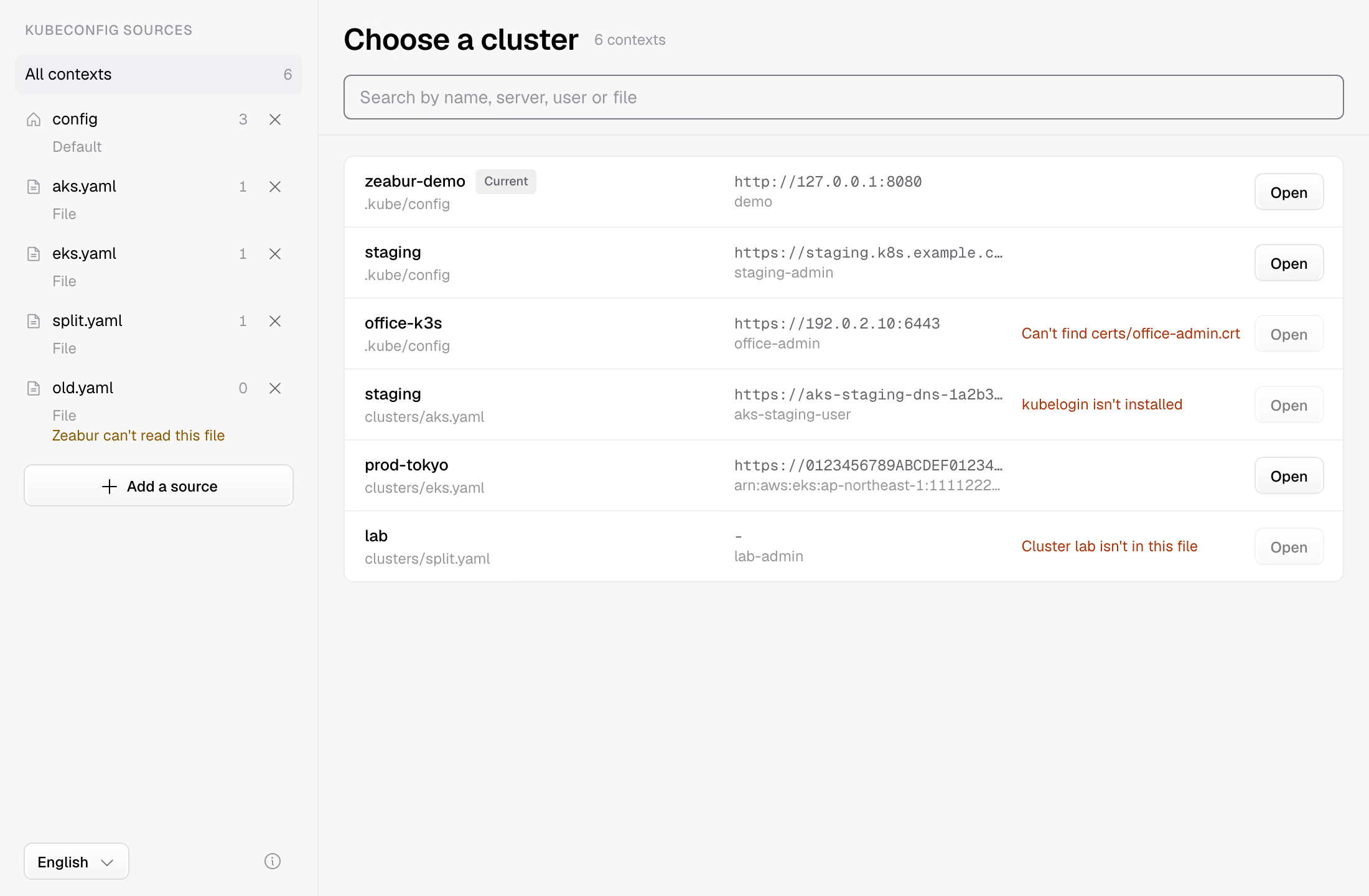
It runs on macOS, Windows and Linux. Download it from the Zeabur Desktop page. Windows has a portable build and Linux has an AppImage, both of which run without an install. On a Mac you can also use Homebrew:
brew tap zeabur-oss/tapbrew install --cask zeabur-oss/tap/zeabur-desktopZeabur Desktop checks for a new version each time it starts. When there is one, an "Update to …" button appears in the sidebar with the release notes, and nothing installs until you click "Update and restart". For the steps, read Zeabur Desktop.
Works the way Zeabur does
Creating projects, deploying from Git, uploading a folder, importing Docker Compose, deploying templates in one click, adding domains and setting environment variables all work as on Zeabur. The only difference is that your services run on your own server.
Templates stay current
When you open the template list, Zeabur OSS fetches the latest templates from Zeabur Catalog, at most once every 6 hours. New and updated templates show up without an upgrade of Zeabur OSS. Services you already deployed don't change.
To decide whether a template fits, Zeabur OSS now checks node by node: each replica has to fit on a single node. Small free slices spread across several nodes no longer count, so you know before you deploy that it really fits.
Change backups any time
The database's Backups tab now has Edit and "Turn off backups". You can change the destination, schedule, retention days and access keys. Turning backups off stops the schedule and keeps every backup already in the bucket.
A restore creates a second database. The original keeps running, and your services keep using it until you have checked the new one and switch over. When you delete a project whose database backups live in object storage in the same project, the review screen lists those backups among the things it will delete, so you can copy them out first.
Failed deploys tell you why
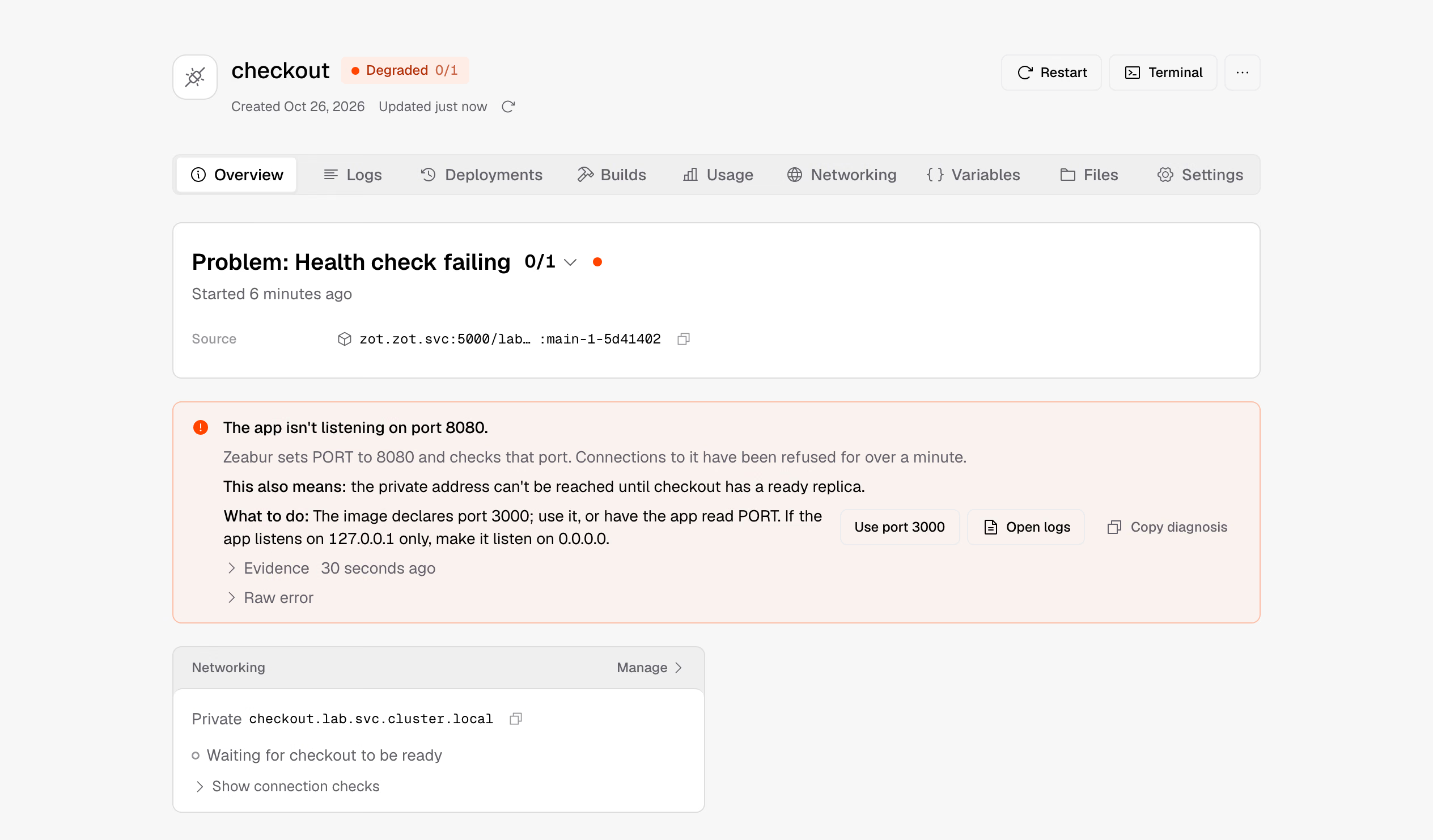
When an app doesn't listen on the port Zeabur OSS checks, the service overview explains why and tells you to read PORT or listen on 0.0.0.0. If the image declares another port, such as 3000, a "Use port 3000" button appears next to it and fixes it in one click.
Teams and automation
Admins can create tokens for CI such as GitHub Actions, or for scripts: open Members, then API tokens, and click "Create token". A token works only in the projects you pick, expires, and is shown once when you create it, together with a kubeconfig you can use right away.
When you invite a member, the projects you tick now default to the developer role, so the member can deploy and read logs on first sign-in.
Upgrading from 0.2.0
If you run 0.2.0, hand the upgrade to an agent with the upgrade prompt above, or read the v0.3.0 release notes first. They list the breaking changes and the steps to take before you upgrade. This release ships together with Zeabur Identity 0.3.3, Zeabur Catalog 0.6.1 and Zeabur Builder 0.2.5.
Testing
Six betas came before this release. The last rounds ran on real Linode servers with Ubuntu 24.04, in two sizes: 2 vCPU with 4 GB, and 1 vCPU with 2 GB. They covered fresh installs and upgrades; deploys from Git, an uploaded folder, an image, a template and a database; and domains, backups, members and deleting projects.
Every problem these rounds found was fixed before the release. For example, when you delete a project, the review screen now says which database backups go with it (#912).
Get involved
- Ideas, suggestions or problems? Bring them to Discord.
- If something goes wrong while you move or install, open an issue in Zeabur OSS issues with the commands you ran and their output.