 @pan93412
When you click “Delete service” on a platform, how does it delete the Deployment in Kubernetes for you?
The most straightforward approach is to give the platform a with access to the cluster. The platform checks whether you're allowed to delete the service, then calls the Kubernetes API with its own ServiceAccount. If that account has access to every , the platform's own permission checks are the only thing limiting what each user can do.
Zeabur Open Source leaves that decision to Kubernetes. Once a user signs in, it calls the same API with that user's token. Suppose the user can only delete Deployments in the dev Namespace. If they try to delete a Deployment in production through Zeabur Open Source, rejects the request under 1.
Why does a platform breach affect its customers?
Several developer platforms were breached in October 2026 alone. According to Wiz, at least nine AI developer platforms disclosed security incidents that month. Attackers were after much the same thing: environment variables stored by the platforms, especially API keys for AI services2.
Zeabur was one of them. An attacker obtained a cluster admin token with no expiration, reached the platform database, and exfiltrated data for 321,810 accounts and 3,218,965 environment variable records3. A week later, an attacker at Railway escalated privileges from the build infrastructure, obtained CI credentials, and decrypted some of the environment variables stored in encrypted form. Up to about 100,000 workspaces were affected4. By the end of the month, secrets stored in Northflank's control plane had also been decrypted. Customers reported unauthorized use of their AI API keys, and Northflank had to ask all customers to assume every environment variable was compromised and rotate them all5.
This had happened before. In Zeabur's August incident, the attacker entered through a vulnerability in a user container and eventually reached the production database, obtaining the names and values of project environment variables6. Vercel's entry point was a third-party AI tool used by an employee7. CircleCI's was malware on an engineer's laptop8. GitHub integrations were compromised through stolen OAuth tokens held by Heroku and Travis CI9. After Codecov's uploader was tampered with, it sent environment variables straight out of customers' CI environments10.
The entry points differed, but the attackers wanted the same things. Platforms store customer data and hold the credentials needed to access customer resources. Often, another key inside the platform is all that protects that data: Zeabur's cluster admin token, for example, or Railway's CI credentials. Encryption doesn't stop the attacker when the platform also holds the decryption keys. Railway's and Northflank's environment variables were decrypted; CircleCI's encryption keys were extracted directly from a running process.
Once attackers breach the platform, they can use its identity to read every customer's data. A compromised platform means compromised customers.
Users shouldn't have to trust the platform
NIST SP 800-207 describes Zero Trust as refusing to grant implicit trust just because a request comes from an internal network or a company-owned device. Access still requires authentication and authorization, with only the permissions needed for the operation11.
Apply that principle to the platform itself: users shouldn't have to trust the platform. Instead of holding a credential that can act on every customer's resources, the platform acts on each user's behalf with that user's permissions. The system hosting the resource decides whether to allow each request based on the user's identity.
That way, even an attacker who breaches the platform has no master key. The only tokens available belong to people currently using the platform. Each token expires, and none grants more access than its user already has. CircleCI's advice after its incident follows the same idea: use tokens and store fewer long-lived credentials8.
Back to deleting a Deployment: Zeabur Open Source uses the user's token directly, so it doesn't need to keep a shared credential with access to every Namespace. The same RBAC rules apply whether you use Zeabur Open Source or run kubectl yourself.
That's the theory. How does it work in Kubernetes?
How does Kubernetes know whose token it is?
Suppose Alice has signed in and received a signed . The token contains her username and groups. How does kube-apiserver know it's really Alice, rather than someone sending a token they made up?
Kubernetes already supports OIDC authentication12. A cluster administrator configures a trusted issuer: the authentication server that issues tokens. kube-apiserver verifies signatures with that issuer's public key, then maps the token's claims to Kubernetes users and groups. An expired token, or one that wasn't signed by a trusted issuer, fails authentication.
RBAC comes next. If Alice belongs to the dev group and an administrator grants that group access to the dev Namespace, Alice can work with resources there. RBAC permissions are additive, with no deny rules. If another binding grants Alice broader permissions, she gets those too13.
Zeabur Open Source only needs to include Alice's token in the request. It doesn't need its own list of the Namespaces she can access.
The right side of the diagram shows this flow. Zeabur Identity handles sign-in and issues tokens. Zeabur Open Source forwards the token, and kube-apiserver verifies the signature and checks RBAC. On the left, the platform holds shared, highly privileged credentials and checks users' permissions itself.
Connecting Zeabur Identity users to RBAC
Zeabur Identity is the OIDC issuer for Zeabur Open Source and primarily uses for sign-in. It keeps track of users and groups. The cluster administrator configures which Kubernetes resources each group can access14.
zeabur-identityctl kube-config generates an AuthenticationConfiguration for kube-apiserver. For example, alice in Zeabur Identity maps to zeabur:alice in Kubernetes, and the dev group becomes zeabur:dev. The zeabur: prefix keeps these mapped identities separate from built-in identities that start with system:15.
To let the dev group edit resources in the dev Namespace, create this RoleBinding. Zeabur Identity's documentation also recommends binding roles to groups rather than individual users14:
kubectl create rolebinding dev-edit --clusterrole=edit --group=zeabur:dev -n devWhen Alice signs in with dev in her token's groups, kube-apiserver grants her the permissions from this binding. Zeabur Identity's own ServiceAccount can't create RBAC objects and has no impersonate permission. It can read only a few Secrets of its own, and each must be requested by name. The default admin binding is applied by the cluster administrator, using their own permissions, during installation16.
Who issues the key card? Who opens the door?
If issuers, signature verification, and RBAC still feel abstract, think of a hotel key card.
Zeabur Identity is the front desk. Signing in with a passkey is like showing your ID at check-in. The front desk gives you a key card marked “Alice, dev team.” kube-apiserver is the door lock: it checks that the front desk issued the card, then looks up which rooms the dev team can enter (RBAC). Zeabur Open Source is a runner who carries your card and uses it to open doors for you. The runner has no separate key that opens every room.
How long does that card last? If it never expires, the platform can keep acting on your behalf once it has it. Zeabur Identity's regular access tokens expire after 10 minutes by default; admin tokens expire after 5 minutes. Within a session, a refresh token can get you a new card, so you don't have to use your passkey every 10 minutes. By default, though, a session ends after 1 hour of inactivity. Even with refreshes, it lasts no more than 12 hours from sign-in by default17.
Structured Authentication Configuration, stable since Kubernetes v1.34, can use to check token claims18. The configuration generated by Zeabur Identity has kube-apiserver check token lifetimes: tokens whose exp - iat exceeds the limit are rejected15.
The front desk gives the lock its public key in advance, so the lock checks cards on its own without calling the desk.
Compare: a platform that uses its own high-privilege ServiceAccount is a runner carrying a master key to the whole hotel.
Access tokens use the JWT format defined in RFC 9068 and must contain a
client_idclaim19. The kube-apiserver configuration generated by Zeabur Identity checks this claim to reject ID tokens15.
If someone steals a token from the platform, they can use it to access resources Alice has permission to use until it expires. A stolen admin token gives them more access. That's why Zeabur Identity admin accounts can sign in only with passkeys. Their tokens carry the zeabur:admins group, which is bound to cluster-admin during installation16. The recommendation is to use a separate regular account for everyday work and sign in with the admin account only when you need to administer the cluster17.
The issuer's signing keys also need protection. kube-apiserver grants access based on identities signed by Zeabur Identity. Anyone who can issue a forged “this is Alice” token can obtain Alice's permissions.
Incidentally, Zeabur Identity runs as a small Pod, uses less than 30 MiB of memory after sign-in, and has no database of its own. Users, credentials, and sessions are all stored as Kubernetes custom resources20.
How does the platform become an OAuth client?
Zeabur Open Source is an OAuth client of Zeabur Identity21. It signs users in with the authorization code flow and 22, with security settings based on RFC 97002324. First, register it as a 25:
zeabur-identityctl client create zeabur \ --type confidential \ --audience kubernetes \ --display-name Zeabur \ --redirect-uri https://zeabur.example.com/auth/callback \ --home-url https://zeabur.example.com/ \ | kubectl apply -f -The sign-in flow looks roughly like this:
The dashed lines are round trips that happen only during sign-in. After that, only the bottom two solid lines remain: Zeabur Open Source sends your token directly to kube-apiserver with every request.
When Zeabur Open Source needs to know who you are, for example to read account details, it uses SelfSubjectReview to ask kube-apiserver “who does this token belong to?” It doesn't determine the user's identity by interpreting an ID token itself2426.
The zeabur-kube crate makes the Kubernetes API calls. It creates clients with the user's token. The sole exception is the terminal, which uses Zeabur Open Source's own ServiceAccount1. That ServiceAccount is bound to a single Role that lets it create Pods in a dedicated terminal Namespace and connect to them to run commands27. For example, this command checks whether it has permission to impersonate other users:
kubectl auth can-i impersonate users --as=system:serviceaccount:zeabur:zeaburThis command checks impersonate users. To check permissions on other resources, substitute the corresponding operation. The result also changes if the cluster administrator binds additional roles to this ServiceAccount.
Secrets are read with the user's token too. The list shows only names, types, and key counts; values are fetched from Kubernetes only when you ask to reveal them28. Whether you can see a Secret's contents therefore depends on your permission to read it2629.
What happens when you don't have enough permission? Zeabur Open Source doesn't retry with its own identity. When kube-apiserver rejects a request, the interface lists the missing permissions and the original Kubernetes response, and asks you to contact an administrator30. On the cluster page, you can also copy the required ClusterRole to send to the administrator31.
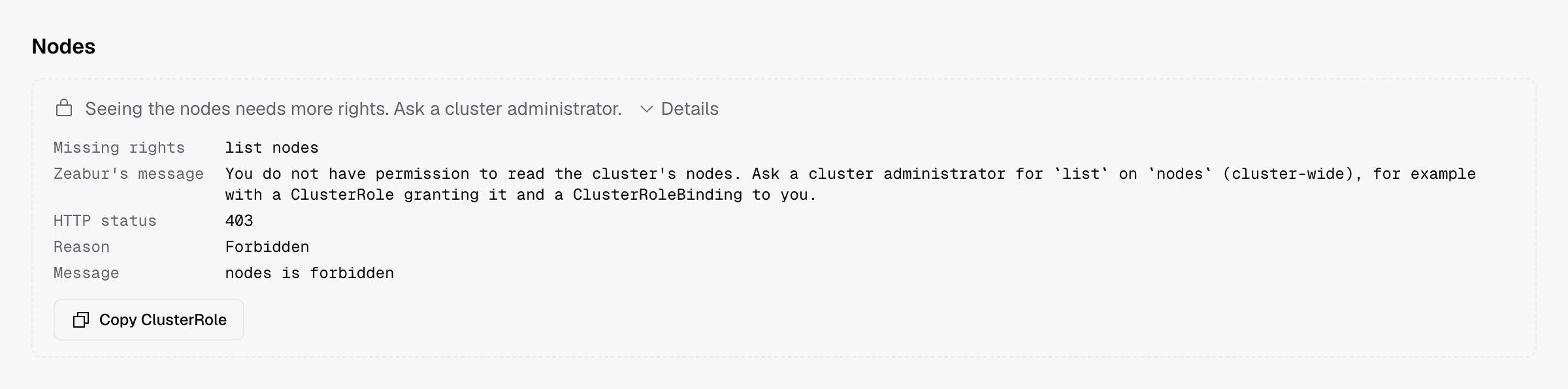
If you need to administer the cluster yourself, sign out and sign back in with your admin account using a passkey. The RBAC permissions associated with that token still determine which operations succeed17.
Zeabur Open Source keeps no separate copy of project data. A project is a Kubernetes Namespace. If you remove Zeabur Open Source, your workloads stay in place, and you can keep managing them with kubectl, Helm, or your existing GitOps tools32. To revoke a user's access, change the corresponding RBAC bindings.
Zeabur Open Source and Zeabur Identity are both public on GitHub. If you're interested, try installing them on a single server.
References
-
Zeabur, “zeabur-kube: Identity and UserClient,” source code. [Online]. Available: https://github.com/zeabur-oss/zeabur/blob/306085bad74fb151fe4353a63adc50e3de9de4cd/crates/zeabur-kube/src/lib.rs (accessed Nov. 7, 2026). ↩ ↩2
-
B. Read and R. McCarthy, "“Black October” for AI developer platforms," Wiz Blog, Oct. 30, 2026. [Online]. Available: https://www.wiz.io/blog/black-october-for-ai-developer-platforms (accessed Nov. 7, 2026). ↩
-
Zeabur, “Zeabur 2026 年十月資安事件(初步報告),” Zeabur Blog, Oct. 19, 2026. [Online]. Available: https://zeabur.com/zh-TW/blogs/october-2026-security-incident (accessed Nov. 7, 2026). ↩
-
J. Cooper and A. Saraceno, "Preliminary report: Oct 21st security incident," Railway Blog, Oct. 22, 2026. [Online]. Available: https://blog.railway.com/p/preliminary-report-october-security-incident (accessed Nov. 7, 2026). ↩
-
Northflank, "Security incident," Northflank Status, Nov. 6, 2026. [Online]. Available: https://status.northflank.com/ (accessed Nov. 7, 2026). ↩
-
Zeabur, "Zeabur August 2026 security incident," Zeabur Blog, Sep. 7, 2026. [Online]. Available: https://zeabur.com/blogs/august-2026-security-incident (accessed Oct. 17, 2026). ↩
-
Vercel, "Vercel April 2026 security incident," Vercel Knowledge Base, Apr. 2026. [Online]. Available: https://vercel.com/kb/bulletin/vercel-april-2026-security-incident (accessed Oct. 17, 2026). ↩
-
CircleCI, "CircleCI Jan 4, 2023 security incident report," CircleCI Blog, Jan. 12, 2023. [Online]. Available: https://circleci.com/blog/jan-4-2023-incident-report/ (accessed Oct. 17, 2026). ↩ ↩2
-
GitHub, "Security alert: Attack campaign involving stolen OAuth user tokens issued to two third-party integrators," GitHub Blog, Apr. 15, 2022. [Online]. Available: https://github.blog/2022-04-15-security-alert-stolen-oauth-user-tokens/ (accessed Oct. 17, 2026). ↩
-
Codecov, "Bash Uploader security update," Codecov, Apr. 2021. [Online]. Available: https://about.codecov.io/security-update/ (accessed Oct. 17, 2026). ↩
-
S. Rose, O. Borchert, S. Mitchell, and S. Connelly, "Zero trust architecture," National Institute of Standards and Technology, Gaithersburg, MD, USA, NIST SP 800-207, Aug. 2020, doi: 10.6028/NIST.SP.800-207. ↩
-
The Kubernetes Authors, "Authenticating," Kubernetes Documentation. [Online]. Available: https://kubernetes.io/docs/reference/access-authn-authz/authentication/ ↩
-
The Kubernetes Authors, "Using RBAC authorization," Kubernetes Documentation. [Online]. Available: https://kubernetes.io/docs/reference/access-authn-authz/rbac/ ↩
-
Zeabur, “新增與管理使用者,” Zeabur Identity documentation. [Online]. Available: https://github.com/zeabur-oss/identity/blob/d4263d1e0089ba6754ce21693489716fa4831617/docs/zh-TW/users/manage-users.mdx (accessed Nov. 7, 2026). ↩ ↩2
-
Zeabur, “Zeabur Identity: kube-apiserver configuration,” source code. [Online]. Available: https://github.com/zeabur-oss/identity/blob/d4263d1e0089ba6754ce21693489716fa4831617/crates/zeabur-identity-k8s/src/kube_config.rs (accessed Nov. 7, 2026). ↩ ↩2 ↩3
-
Zeabur, “Zeabur Identity: deployment RBAC,” source code. [Online]. Available: https://github.com/zeabur-oss/identity/blob/d4263d1e0089ba6754ce21693489716fa4831617/crates/zeabur-identity-k8s/src/rbac.rs (accessed Nov. 7, 2026). ↩ ↩2
-
Zeabur, “Admin accounts and sessions,” Zeabur Identity documentation. [Online]. Available: https://github.com/zeabur-oss/identity/blob/d4263d1e0089ba6754ce21693489716fa4831617/docs/users/admin-sessions.mdx (accessed Nov. 7, 2026). ↩ ↩2 ↩3
-
The Kubernetes Authors, "KEP-3331: Structured authentication config," Kubernetes Contributors. [Online]. Available: https://www.kubernetes.dev/resources/keps/3331/ (accessed Oct. 16, 2026). ↩
-
V. Bertocci, "JSON Web Token (JWT) profile for OAuth 2.0 access tokens," IETF, RFC 9068, Oct. 2021. [Online]. Available: https://www.rfc-editor.org/rfc/rfc9068 ↩
-
Zeabur, “Zeabur Identity architecture,” Zeabur Identity documentation. [Online]. Available: https://github.com/zeabur-oss/identity/blob/d4263d1e0089ba6754ce21693489716fa4831617/docs/reference/architecture.mdx (accessed Nov. 7, 2026). ↩
-
D. Hardt, Ed., "The OAuth 2.0 authorization framework," IETF, RFC 6749, Oct. 2012. [Online]. Available: https://www.rfc-editor.org/rfc/rfc6749 ↩
-
N. Sakimura, Ed., J. Bradley, and N. Agarwal, "Proof Key for Code Exchange by OAuth public clients," IETF, RFC 7636, Sep. 2015. [Online]. Available: https://www.rfc-editor.org/rfc/rfc7636 ↩
-
T. Lodderstedt, J. Bradley, A. Labunets, and D. Fett, "Best current practice for OAuth 2.0 security," IETF, RFC 9700, Jan. 2025. [Online]. Available: https://www.rfc-editor.org/rfc/rfc9700 ↩
-
Zeabur, “Zeabur as a confidential OAuth 2.0 client of Zeabur Identity,” source code. [Online]. Available: https://github.com/zeabur-oss/zeabur/blob/306085bad74fb151fe4353a63adc50e3de9de4cd/crates/zeabur-auth/src/client.rs (accessed Nov. 7, 2026). ↩ ↩2
-
Zeabur, “Install Zeabur in an existing cluster,” installation documentation. [Online]. Available: https://github.com/zeabur-oss/zeabur/blob/306085bad74fb151fe4353a63adc50e3de9de4cd/docs/install/existing-cluster.mdx (accessed Nov. 7, 2026). ↩
-
Zeabur, “zeabur-kube: secret_summaries, whoami, reveal_secret,” source code. [Online]. Available: https://github.com/zeabur-oss/zeabur/blob/306085bad74fb151fe4353a63adc50e3de9de4cd/crates/zeabur-kube/src/adapter.rs (accessed Nov. 7, 2026). ↩ ↩2
-
Zeabur, “Terminal RBAC,” Helm chart template. [Online]. Available: https://github.com/zeabur-oss/zeabur/blob/306085bad74fb151fe4353a63adc50e3de9de4cd/deploy/chart/zeabur/templates/terminals.yaml (accessed Nov. 7, 2026). ↩
-
Zeabur, “Interface text (zh-TW),” interface source code. [Online]. Available: https://github.com/zeabur-oss/zeabur/blob/306085bad74fb151fe4353a63adc50e3de9de4cd/web/src/i18n/zh-TW.ts (accessed Nov. 7, 2026). ↩
-
Zeabur, “zeabur-kube: hide_secret_values,” source code. [Online]. Available: https://github.com/zeabur-oss/zeabur/blob/306085bad74fb151fe4353a63adc50e3de9de4cd/crates/zeabur-kube/src/objects.rs (accessed Nov. 7, 2026). ↩
-
Zeabur, “Refused: missing permissions and Kubernetes response,” interface source code. [Online]. Available: https://github.com/zeabur-oss/zeabur/blob/306085bad74fb151fe4353a63adc50e3de9de4cd/web/src/components/refused.tsx (accessed Nov. 7, 2026). ↩
-
Zeabur, “Cluster forbidden page: copy ClusterRole,” interface source code. [Online]. Available: https://github.com/zeabur-oss/zeabur/blob/306085bad74fb151fe4353a63adc50e3de9de4cd/web/src/routes/cluster/forbidden.tsx (accessed Nov. 7, 2026). ↩
-
Zeabur, “Remove Zeabur and keep services running,” documentation. [Online]. Available: https://github.com/zeabur-oss/zeabur/blob/306085bad74fb151fe4353a63adc50e3de9de4cd/docs/leave/uninstall.mdx (accessed Nov. 7, 2026). ↩