 @pan93412
Zeabur is now open source. We took what four years of building and running a deployment platform taught us, combined it with our research into security and usability, and rebuilt Zeabur as something you can host yourself. Put it on your own server or Kubernetes cluster, keep deploying and managing services the way you're used to, and read or change the code.
Work on Zeabur 2.0 started a long time ago. Zeabur 1.0 stored every service's configuration in its own database and generated Kubernetes resources from it. If a user needed a setting that format didn't have, they had to wait for us to add it. If an engineer changed the cluster directly with kubectl, the platform's records no longer matched the cluster. The more requests came in, the more time this took, so we wanted to remove that layer and read configuration straight from the cluster. User requests also kept sending us back to the original design. As the number of services grows, how does the interface help people keep track of them? When an engineer needs finer control, does the platform leave them room to work? When something breaks, do users know where to start?
Removing that layer touches the architecture, the deploy pipeline and the interface, and the existing platform had services running on it that the work had to look after. So part of the work improved the existing code step by step, bringing new features and security improvements to users with as little migration as possible. Ideas with a wider reach became experiments in new code. Doing the whole plan at once wasn't realistic, so we picked a few problems we had never solved well and researched them one at a time.
Looking for new approaches inside Kubernetes
We started by taking another look at what the Kubernetes ecosystem already offers. Domains, certificates, storage, monitoring and databases each have mature solutions. We noted where each one fits, installed and combined them, and watched for what needed adjusting. Some things the platform used to maintain itself could be handed directly to existing components. The remaining work was connecting them into actions that are easy for users to understand.
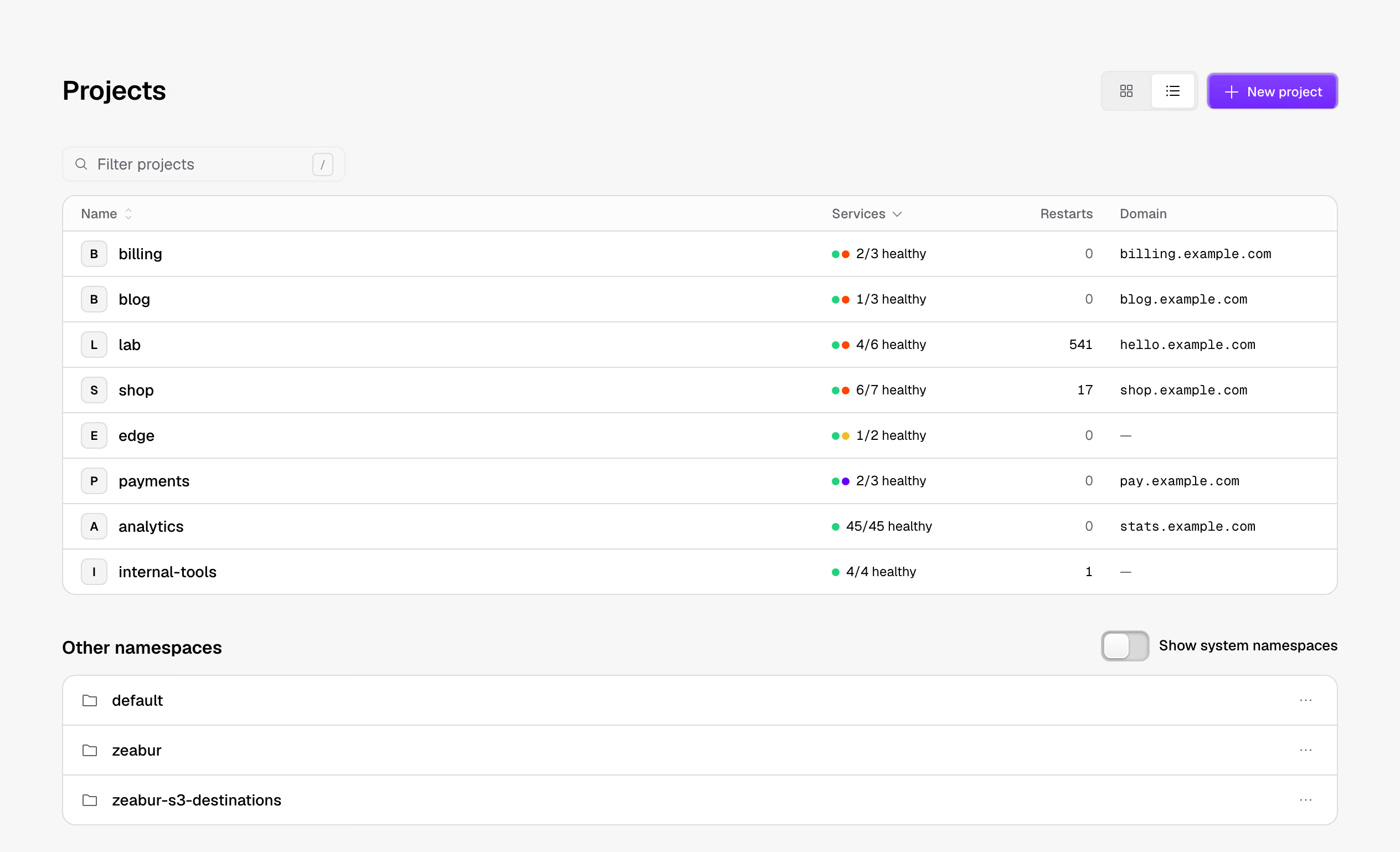
One experiment dropped the duplicate records in our database. Zeabur reads the configuration the cluster is actually using and works out services, domains, environment variables and volumes from how the resources relate to each other.
Once those relationships become a project view, services deployed with other tools show up in the interface, and changes made with kubectl appear the next time Zeabur reads the cluster. Users manage their environment through projects and services, and go back to their usual Kubernetes tools when they need to dig deeper. Teams that already have infrastructure don't need to redeploy anything to use the interface.
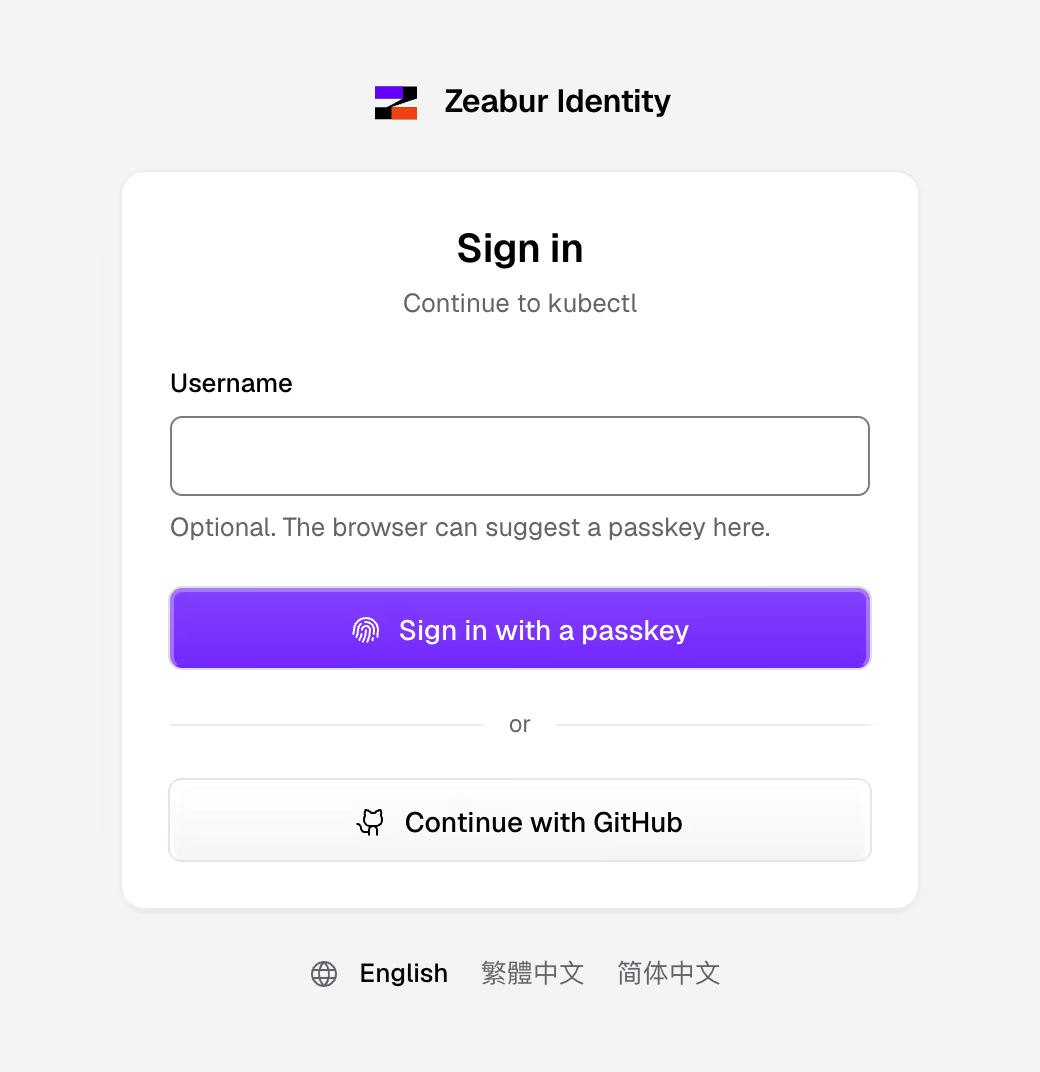
Next came permissions. When a user clicks Restart or opens a configuration, whose identity should the platform act as? We looked into having Kubernetes verify the signed-in user directly and apply the same permission rules to decide whether they can do it. The sign-in work grew complete enough to become a project you can use on its own: Zeabur Identity.
Connecting passkey sign-in and short-lived tokens to Kubernetes authorization was one of the most exciting steps in the project. Everyone signs in with their own account, and Kubernetes RBAC decides what they can do. Admins get a dedicated account that can only sign in with a passkey, and its token expires after 5 minutes. The same flow works with kubectl and other tools that support OpenID Connect, so each team member signs in as themselves and the team depends less on shared, long-lived admin credentials.
While we researched 2.0, we kept hardening the original Zeabur, for example by adding passkey sign-in and moving some sensitive data onto users' own servers. That pushed us to design 2.0 so the platform stores as little data and holds as few permissions as it can.
Then came the security incident. After weighing the rework and maintenance the existing system would need, we decided to shut down the hosted platform. Users told us they hoped Zeabur would be open-sourced, and we weren't ready to let go of research that was starting to pay off. So we reorganized it into an open-source version you can host yourself, and that we'll keep improving.
With the foundation in place, making it smoother
Once the underlying problems were solved, some parts of the experience could finally get better. We turned the support tickets and user feedback we had collected into notes. For each one we asked what the user was trying to do, where they got confused, and what help they needed in the end. Grouping similar problems showed us which ones we could fix in the product design.
Say a service is running but its URL won't load. The user needs to know where the domain should point, whether HTTPS is ready, and whether the app is responding on the right port. Or a database has been created, but the next step is digging up the username and password, assembling a connection string by hand, and pasting it into another service. Each feature already existed. With that abstraction layer in between, though, they were hard to connect. So we started paying close attention to these spots, so that one action leads into the next.
That also meant understanding how different people use the platform. An indie developer may just want to get their code online. An engineer on a team needs to deploy and read logs but has no cluster admin rights. A platform engineer knows Kubernetes well and cares whether their existing tools still work. Some people only need to understand a service's status and hand the problem to the right colleague. We wrote these up as personas and had agents act them out: deploying, connecting databases, setting up domains and troubleshooting. Then we went back through the screens, the code and the docs, checking each place they might get stuck.
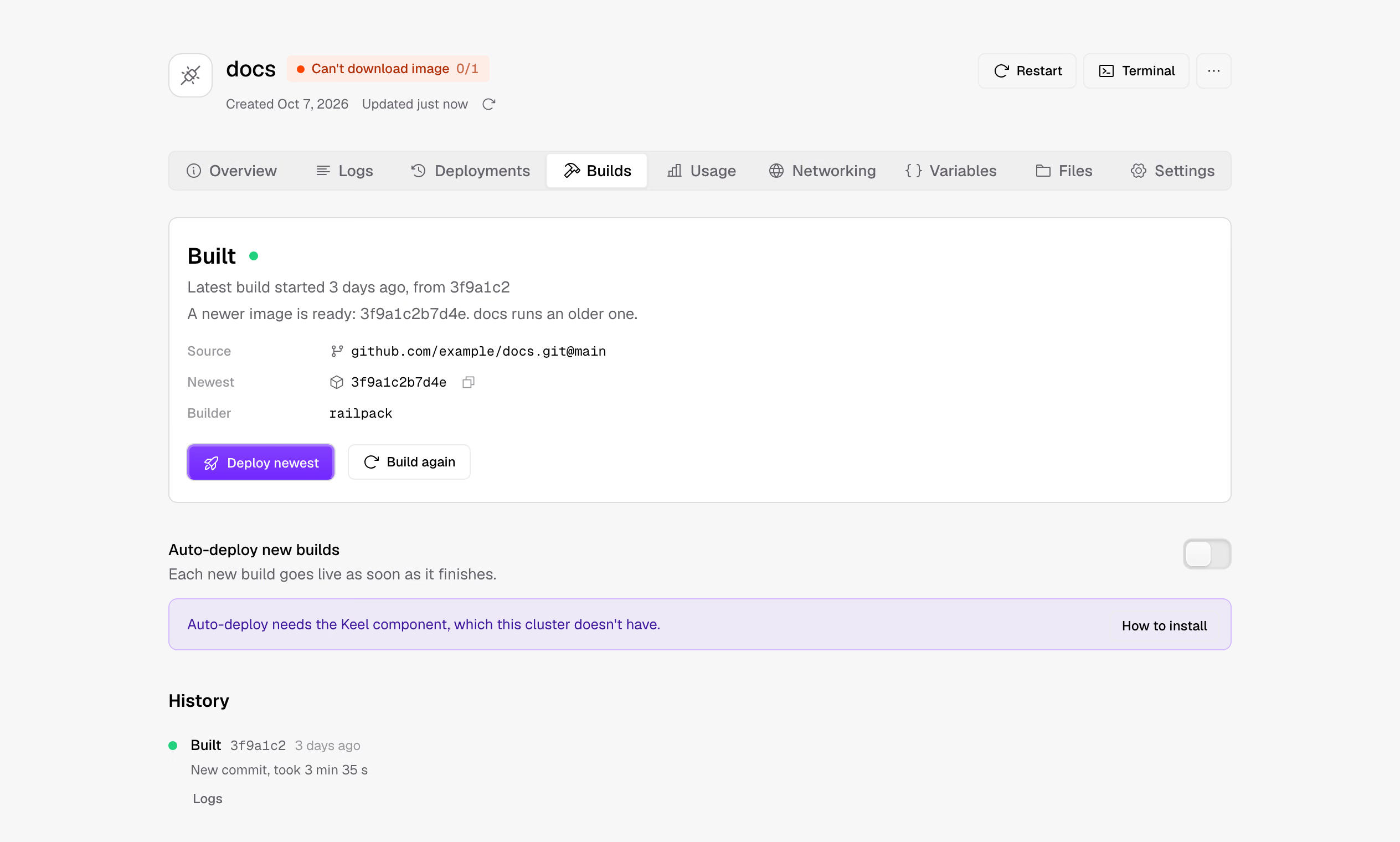
That turned up plenty of problems in the early interface. It could display Kubernetes resources, but a first-time visitor couldn't find where to create a project or deploy an image. The build page named the components underneath, when what users wanted to know was "once the new build finishes, does it go live?" The backup settings listed the full object diff and still didn't make it clear where backups go or how often they run. We reworked the forms, the wording and the change preview: common actions are explained with familiar concepts first, and the low-level details are there when you need them.
We also wrote the methods we kept reusing into development skills. Before writing interface copy, confirm what the user sees and what they're trying to do. For a permission or authentication problem, read the spec and the upstream implementation first. When testing, actually try cases like missing permissions or a setting someone else changes at the same time. The notes keep the context behind our research and decisions; the skills let the agent that picks up the work reuse what we've already learned.
A tool you use every day
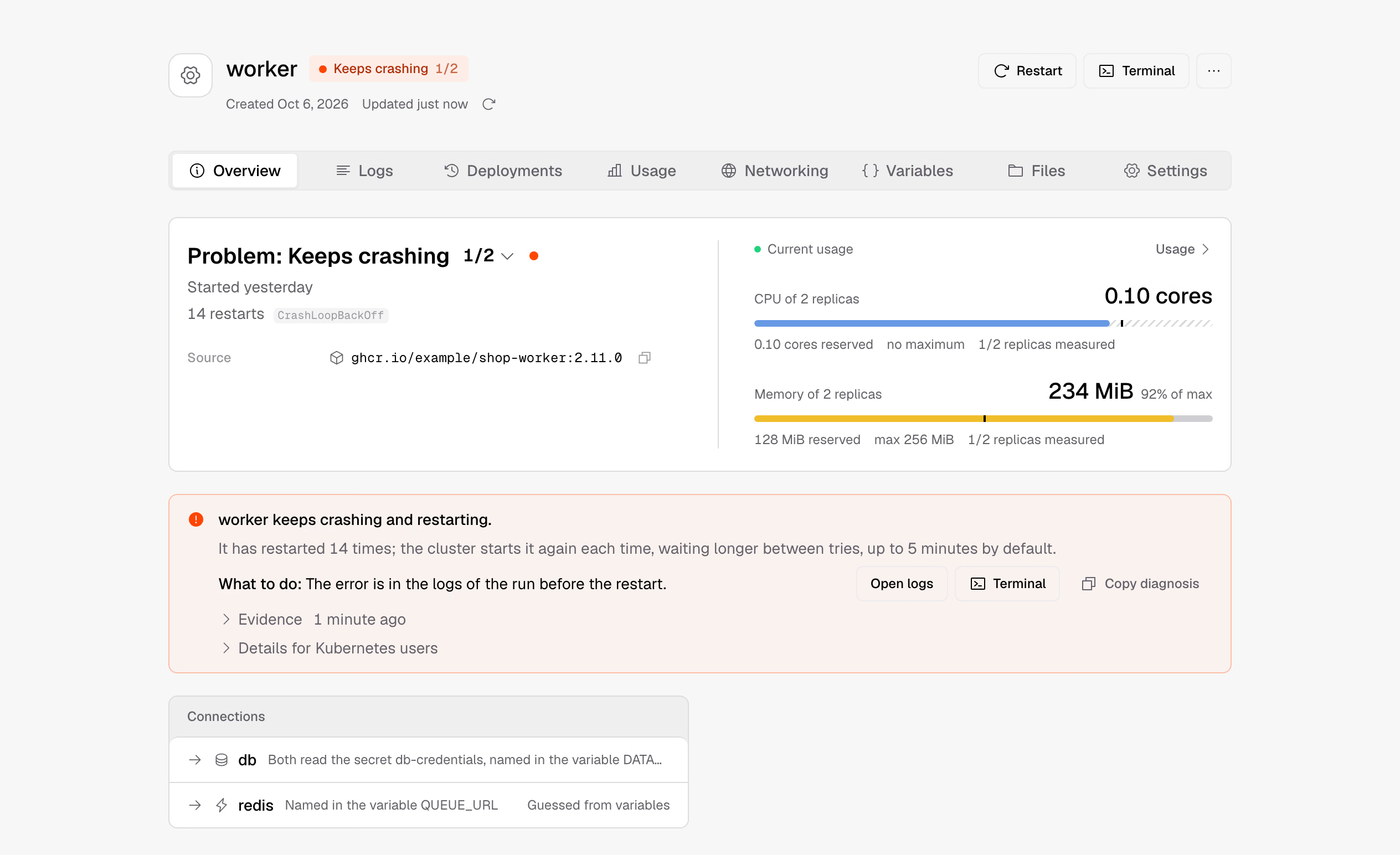
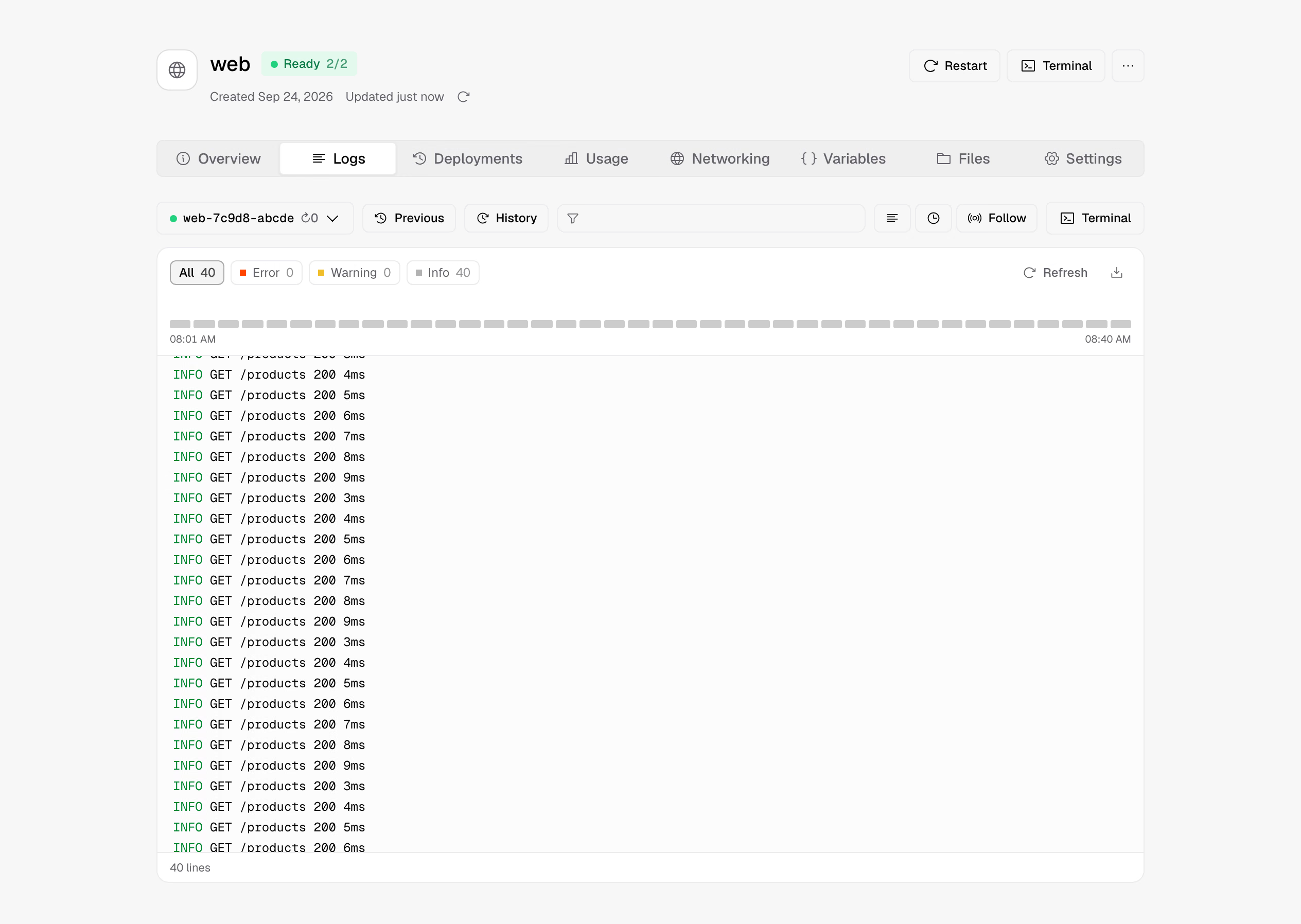
As we used it more, we spent more time on what happens after a service goes live. When a service keeps restarting, Zeabur brings the cause, the logs and the resource usage together. When a domain can't be reached, it follows the path the traffic takes to find what to check. We turned Kubernetes events and status into diagnoses, so the service page explains the problem and also suggests what to do next.
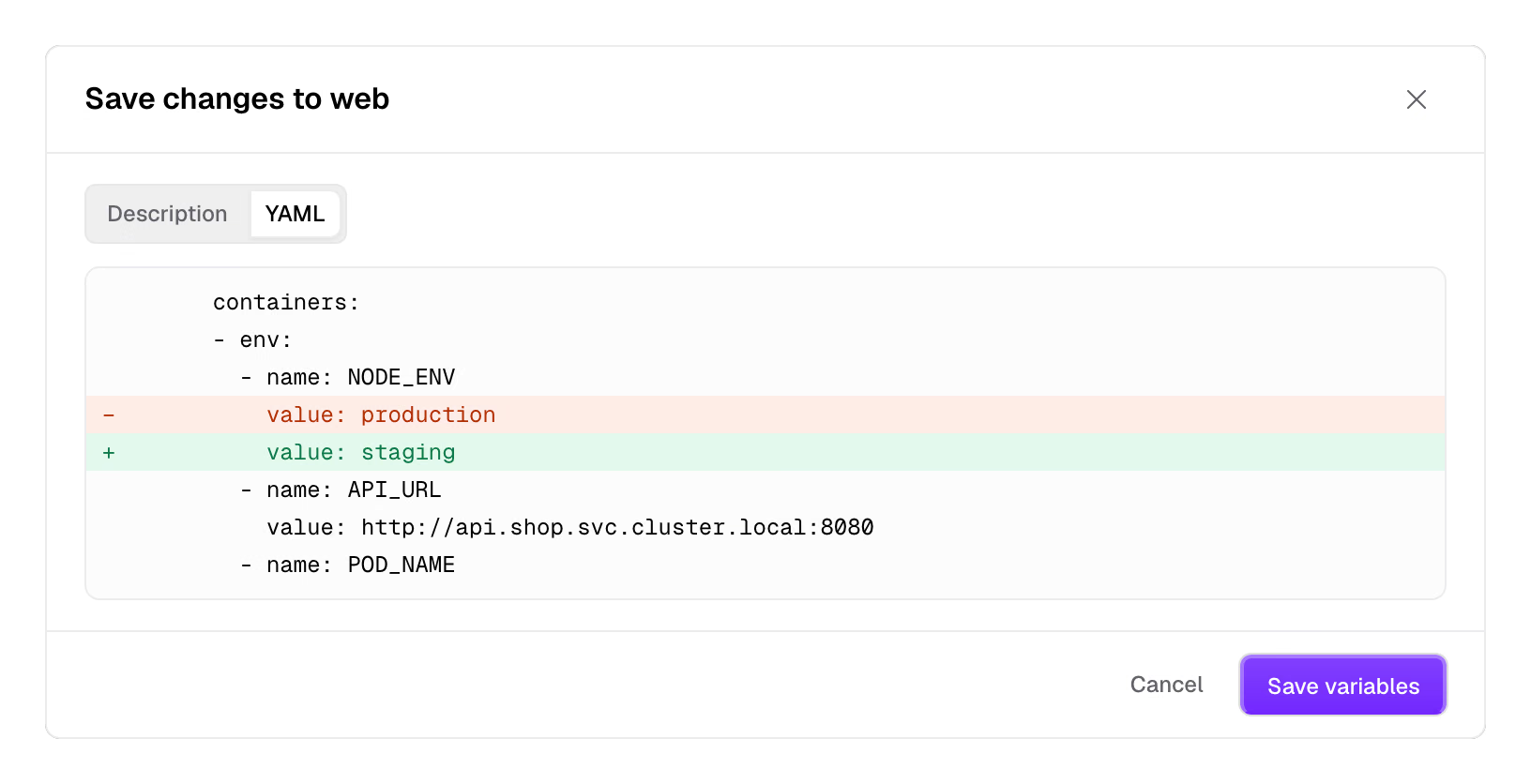
When a new version hasn't deployed yet, the old one may still be serving traffic, and the interface has to make both facts clear. Messages with the same cause should be grouped, so people find the problem to fix first. With several people working at once, you might be changing the replica count while a colleague updates the image. So we built Review changes: you see what's about to change and apply it once you confirm. If the object changed in the meantime, Zeabur reads the current state again. Settings managed by Helm, Argo CD or Flux show where they come from, so you can go back to that tool to change them.
With more apps running, builds were next. Pushing code to Git, building an image and deploying it is how many Zeabur users already work. We kept that flow and built a separate project for it, Zeabur Builder. It keeps each project's build environment and cache apart, sorts out the network and storage access builds need, and passes build variables in as BuildKit secrets.
Back in the interface, users pick Dockerfile or Railpack, set the repository, build directory and variables, check the result in the build history, and choose whether to deploy automatically or promote the new version by hand. Walking through that flow ourselves also showed us where the path from repository to running code was unclear or had steps it didn't need.
AI agents helped with much of the research, implementation and testing, and let us iterate on these experiments faster. Deciding how the product should be used and what's worth improving still took us using and reviewing it ourselves. Sometimes a feature was done and what stopped people was a name they didn't understand, or not knowing what to click next.
From the first server to looking after your data
With service management mostly in place, the questions spread to what comes before and after. How does someone with a single server get started? After deploying, how is data kept, and how do you restore it when something goes wrong? Hosting it yourself means dealing with all of this, so we added an installer, component choices and backup workflows.
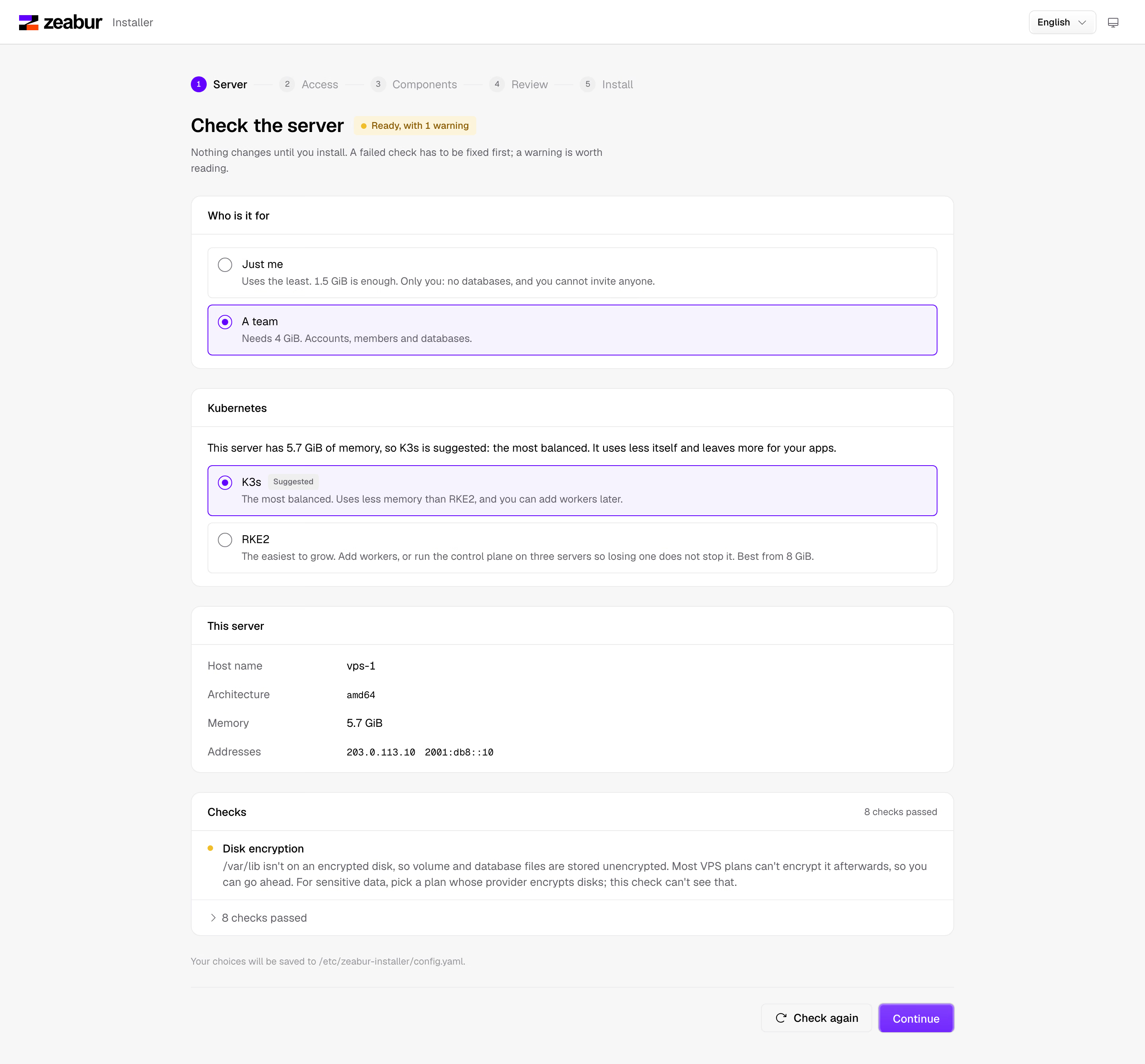
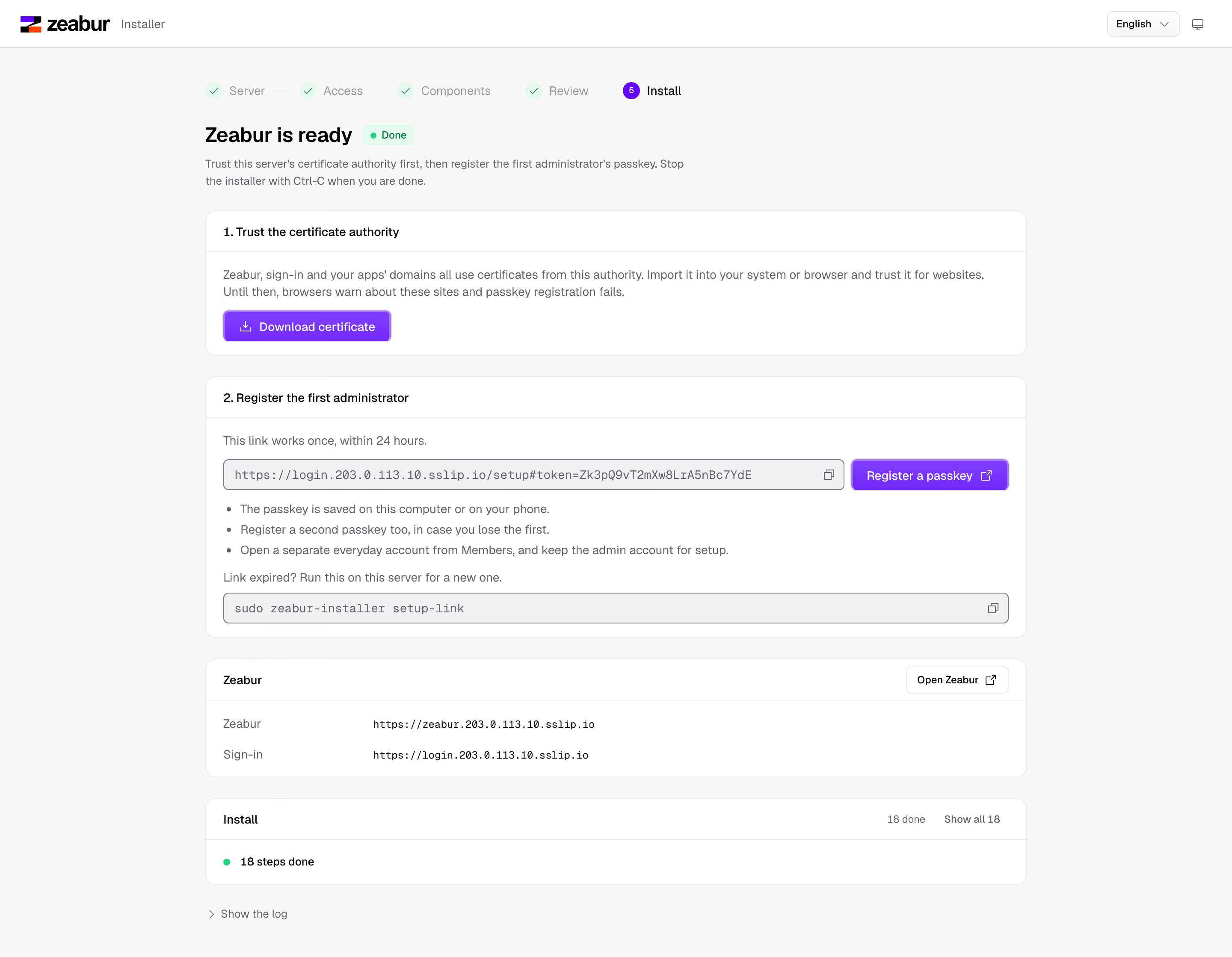
Zeabur Installer turns what we learned about preparing environments into a web-based flow. It checks the host, disks and ports, then you set the URL and pick components, and it runs only after you've confirmed the resource requirements and what will be installed. Kubernetes security settings, encryption of Secrets at rest, and the choice of monitoring and security components are all part of that flow. When it finishes, you register the first admin's passkey, open Zeabur and create your first project.
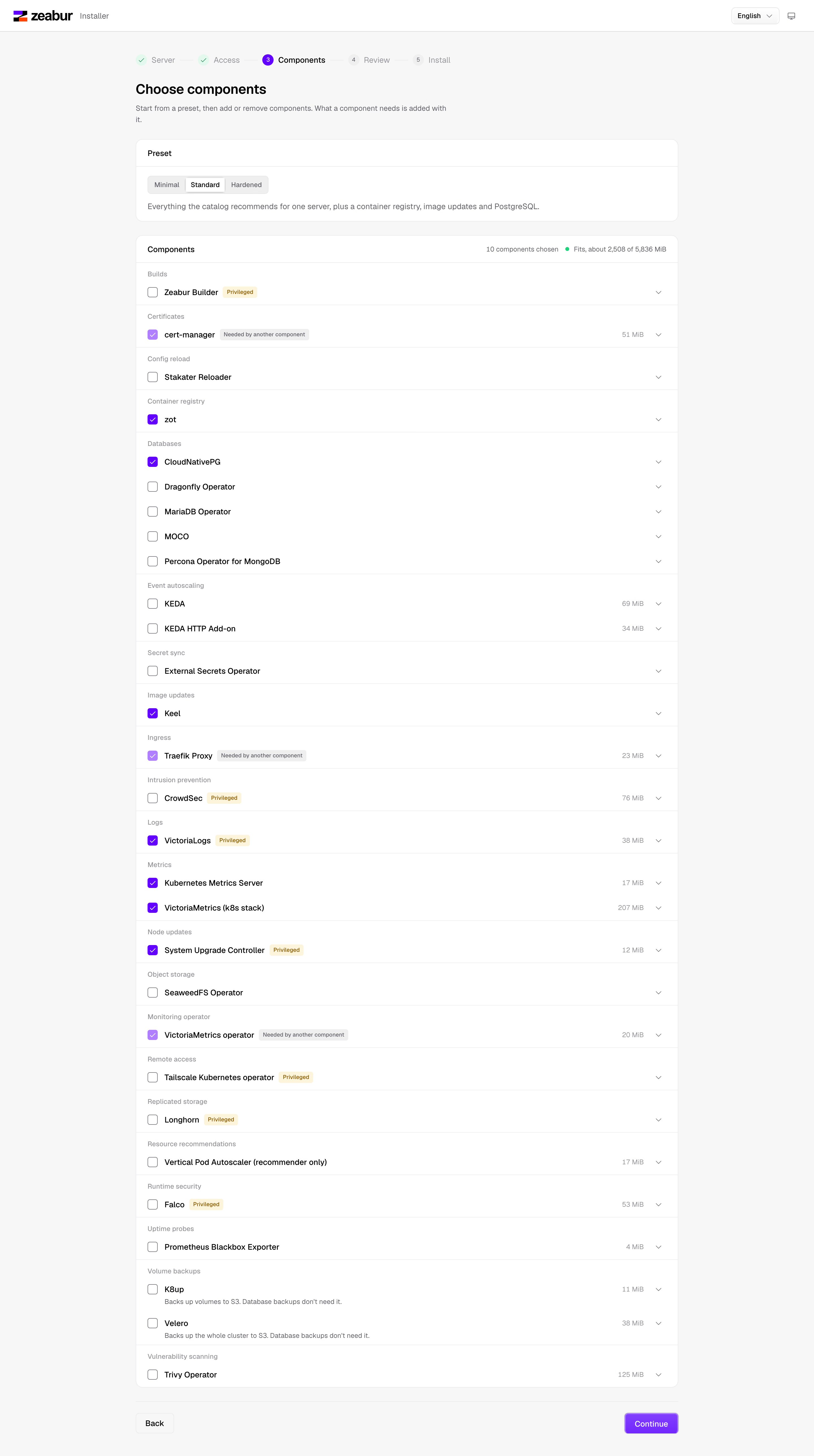
App templates sent us back into the details of data and maintenance. Familiar apps like n8n, Dify and WordPress each have data that must not be lost, things a backup has to include, upgrade steps, and conditions for adding instances. We put that research and the deployment configuration into Zeabur Catalog, with shared cluster components managed separately, so a deployment that starts from a template has something to look up and change later.
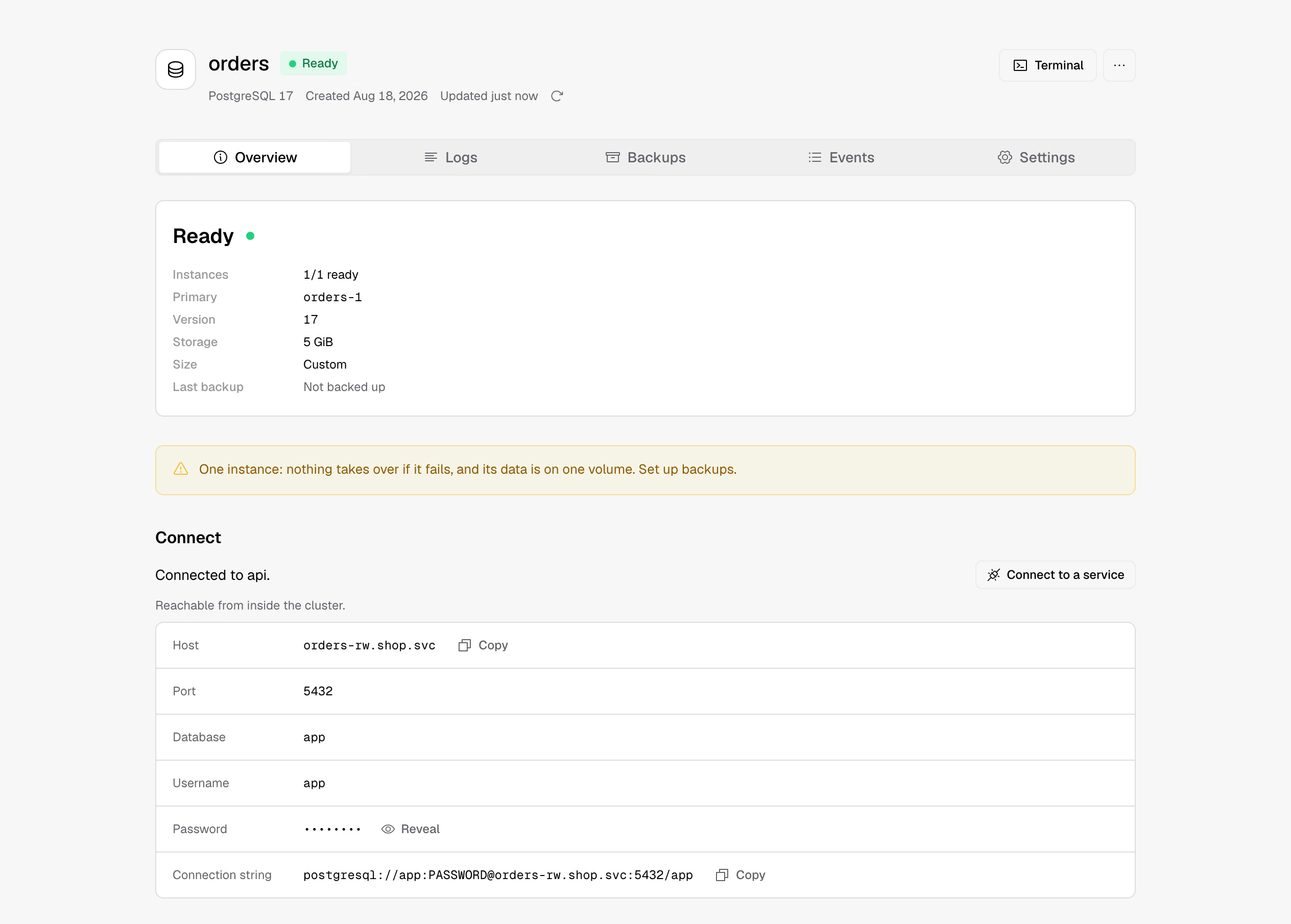
Database work runs from creation and connection through to backup and restore. Zeabur creates the database through the matching operator and passes its connection details to your app. Once you set a backup destination, you can see each run's result, and when you need to, restore into a new database, check its contents, and then plan the switchover. Volume and cluster backups each connect to a suitable tool. By the time someone actually needs to restore, they usually have plenty else to deal with. Having the source, destination, status and steps laid out ahead of time saves them from hunting for them in the moment.
At this point you can start from an empty server and go all the way through installing, signing in, deploying and backing up. Problems we had discussed over and over were now things we could use ourselves, and that was the most rewarding part of the whole project.
Today all of this is public. Zeabur Identity, Zeabur Builder, Zeabur Catalog and the management interface can each evolve on their own and work alongside other Kubernetes tools. The skills we used during development are in the repositories too, so anyone curious can see how we check specs, review the interface, reproduce bugs and hand work to agents. Teams with an existing setup can adopt the parts that fit. If you're starting from one server, there's an install and deploy flow to follow.
Four years of tickets and feedback told us what was worth doing properly, and removing that abstraction layer finally made it possible. Open-source Zeabur will keep changing, but the deploy workflow you learned and the operations your team knows carry over to the new architecture. If you used Zeabur before, come back and see how the things that once got you stuck work now.