Zeatendv0.1.2
One Linux server, a cluster ready to use.
Run sudo zeatend on the server, choose K3s, RKE2 or KubeSolo, and fill in the API server's address and the node name. Zeatend shows the install plan first and installs once you confirm it.
Run these lines on a Linux server to open the install screens.
arch=$(uname -m | sed 's/x86_64/amd64/; s/aarch64/arm64/')
url=https://github.com/zeabur-oss/zeatend/releases/download/v0.1.2
curl -fsSL "$url/zeatend-v0.1.2-linux-$arch.tar.gz" | tar -xzf - zeatend &&
  sudo install -m 0755 zeatend /usr/local/bin/zeatend &&
  sudo zeatend
In your terminal, review the plan, then install.
01How it works
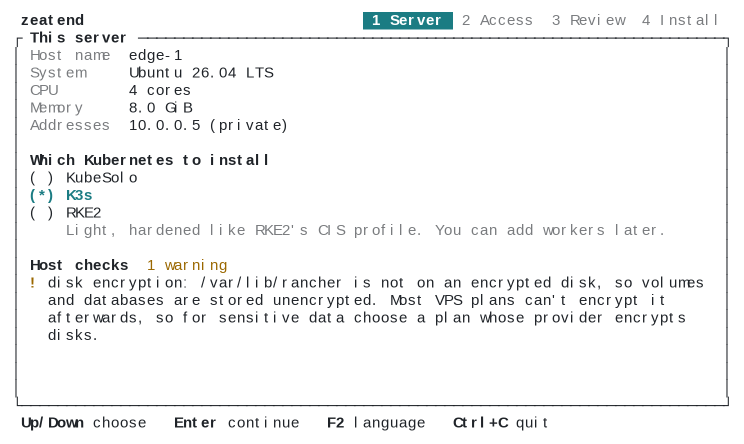
Choose a distribution
The screen shows the host and the results of its checks. Choose K3s, RKE2 or KubeSolo, each hardened to the CIS benchmark.
02How it works
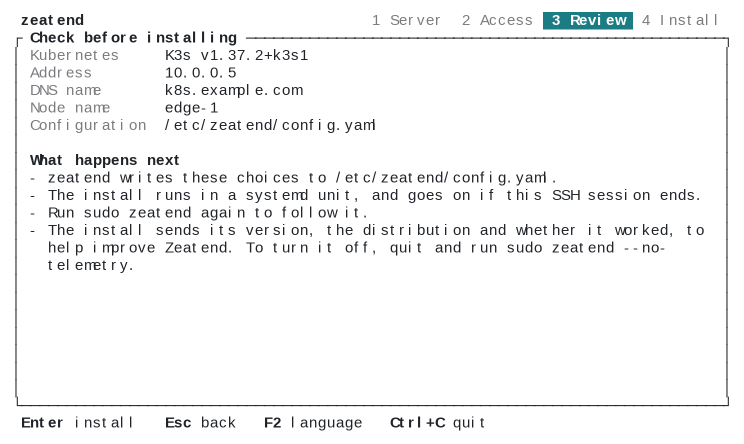
Review the install plan
Fill in the API server's address, its DNS name and the node name. The screen lists the release and the settings to install, and the install starts only once you confirm.
03How it works
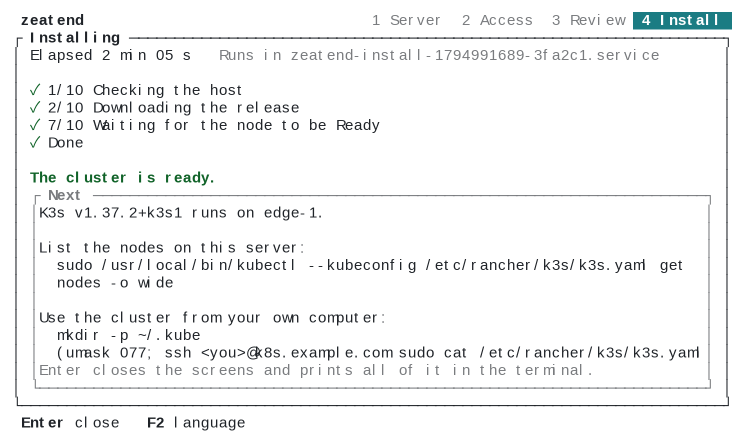
Install
On a host with systemd, the install runs in a systemd unit and goes on when the SSH session ends. Run sudo zeatend apply again to follow its progress.
04Highlights
After the install, Zeatend checks, grows and upgrades it.
- doctor
Checks the host and the cluster
zeatend doctor checks the cluster's service, the API server and that the nodes are Ready, and that Secrets are stored encrypted. Each line that fails names the command to run.
- node add
Adds nodes
Run zeatend node add on a server. It prints the configuration, the commands and the join token for the new VM, on K3s and RKE2 clusters.
- upgrade
One minor version at a time
apply from a newer Zeatend upgrades the host it runs on. Upgrade the servers one at a time, then the workers. When a step would break the Kubernetes version skew policy, apply changes nothing and names the release to apply first.
05Scope
The commands
| Command | What it does |
|---|---|
| sudo zeatend | Opens the install screens, in English, 繁體中文 or 简体中文 |
| zeatend plan | Shows what apply will install and runs the host checks; --json prints the plan as JSON |
| zeatend apply | Installs, or brings an install in line with the configuration file, and is safe to run again; --plan applies a plan you saved |
| zeatend doctor | Checks the host and the cluster and reports with its exit code, for monitoring |
| zeatend node add | Prints the configuration and commands that join a new node to a K3s or RKE2 cluster |
| zeatend uninstall | Removes the cluster and the files Zeatend wrote; volumes go only with --delete-volumes |
06Get started
Download it on the server and install
Run these commands on the Linux server that becomes the cluster. It boots with systemd and runs on amd64 or arm64; K3s needs at least 2 GiB of memory, and the disk with the cluster's data at least 10 GiB free.
- 01
Download and check zeatend
Download zeatend and check it against SHA256SUMS. When sha256sum prints OK, the file is the one on the GitHub release.
version=v0.1.2 arch=$(uname -m | sed 's/x86_64/amd64/; s/aarch64/arm64/') base=https://github.com/zeabur-oss/zeatend/releases/download/$version curl -fsSLO "$base/zeatend-$version-linux-$arch.tar.gz" && curl -fsSLO "$base/SHA256SUMS" && sha256sum --ignore-missing -c SHA256SUMS && tar -xzf "zeatend-$version-linux-$arch.tar.gz" zeatend && sudo install -m 0755 zeatend /usr/local/bin/zeatend - 02
Install the cluster
In the screens, choose K3s, RKE2 or KubeSolo, fill in the address your computer uses to reach the API server, and confirm the install plan to start. Without the screens, run sudo zeatend plan to review it, then sudo zeatend apply; this installs K3s with the defaults. For RKE2 or KubeSolo, write /etc/zeatend/config.yaml first.
sudo zeatend - 03
Check that the cluster is ready
When the install is done, the screen says the cluster is ready and lists the commands that show the nodes and copy the kubeconfig to your computer. Later, sudo zeatend doctor checks the host and the cluster at any time.
sudo zeatend doctor