API tokens
Let scripts and CI call the Kubernetes API with roles in projects, using a token that expires.
An API token lets a script or CI job work with the cluster without anyone's sign-in. Admins create tokens on the Members page and give each one roles in projects, the same way they give a member access. A token calls kube-apiserver directly, the same way kubectl does, and Kubernetes RBAC decides what it can do. Every token expires.
Before you begin
Section titled “Before you begin”- You're an admin. Only admins can create, renew, change, and delete API tokens. See Permissions.
- The machine that uses the token can reach kube-apiserver on TCP 6443.
Create a token
Section titled “Create a token”-
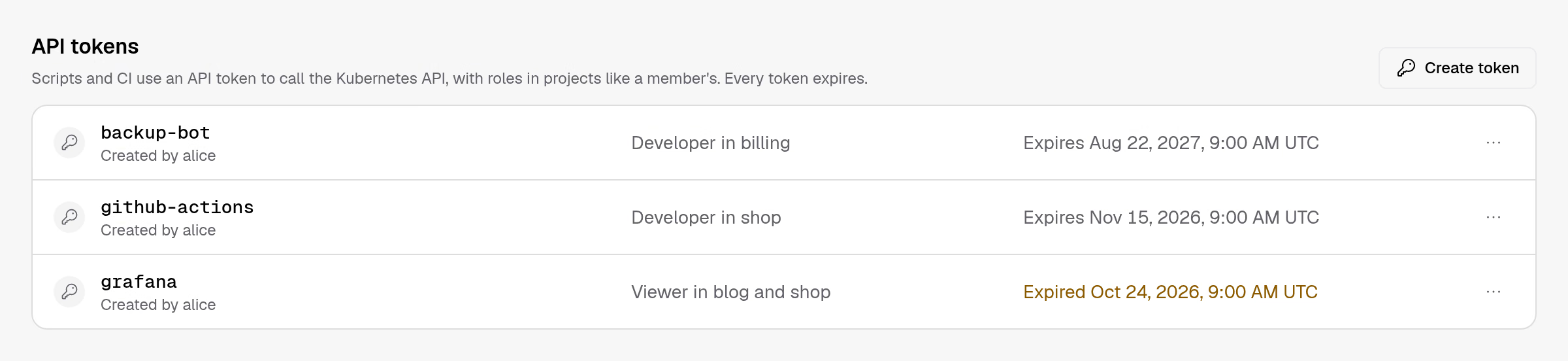
Open Members. Under API tokens, click Create token.
-
Name it after what uses it, such as
deploy-shop. Tick each project it needs and choose Developer or Viewer. Choose how long it lasts, then click Review changes.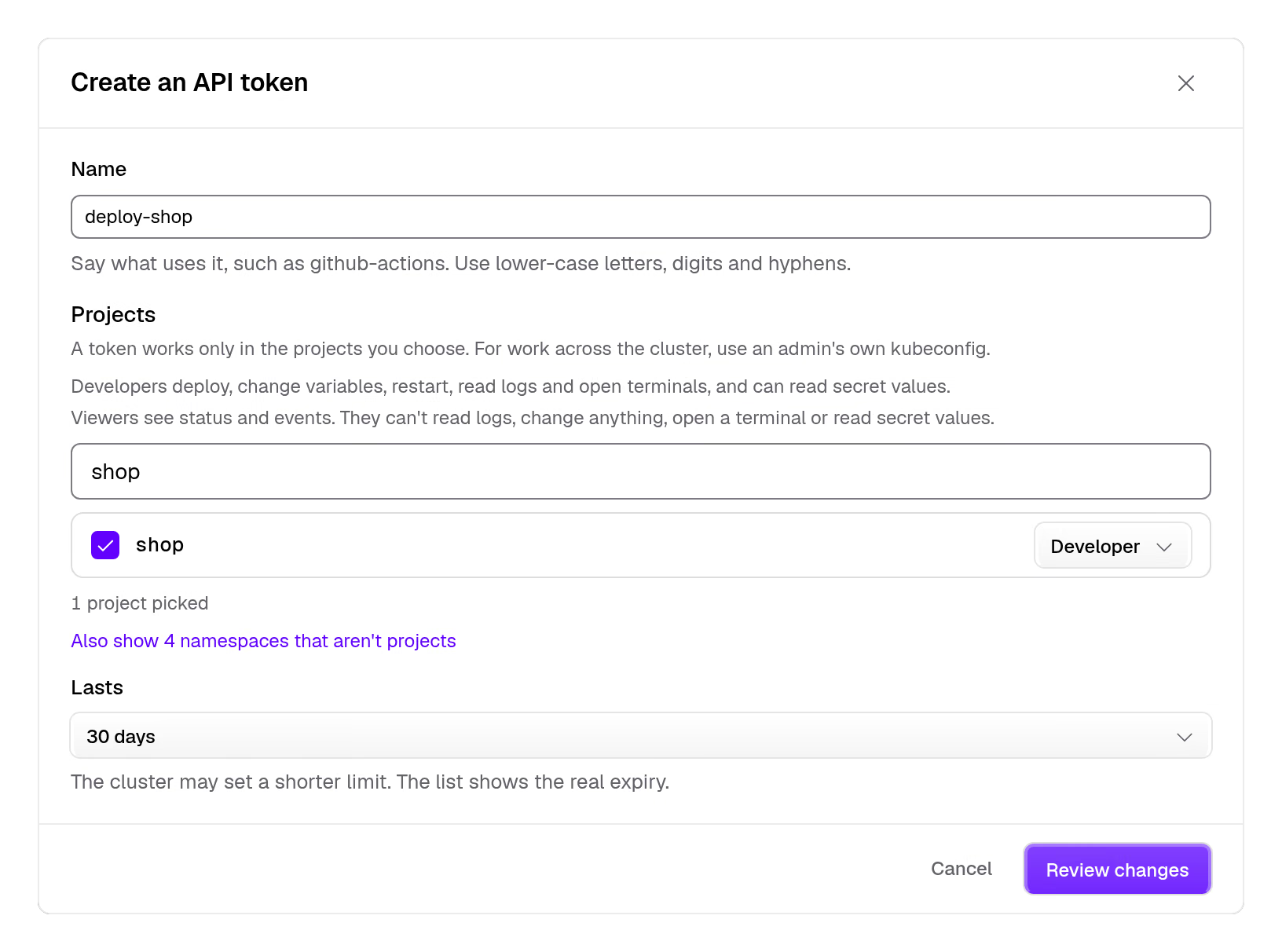
-
Check the changes, then click Create token.
-
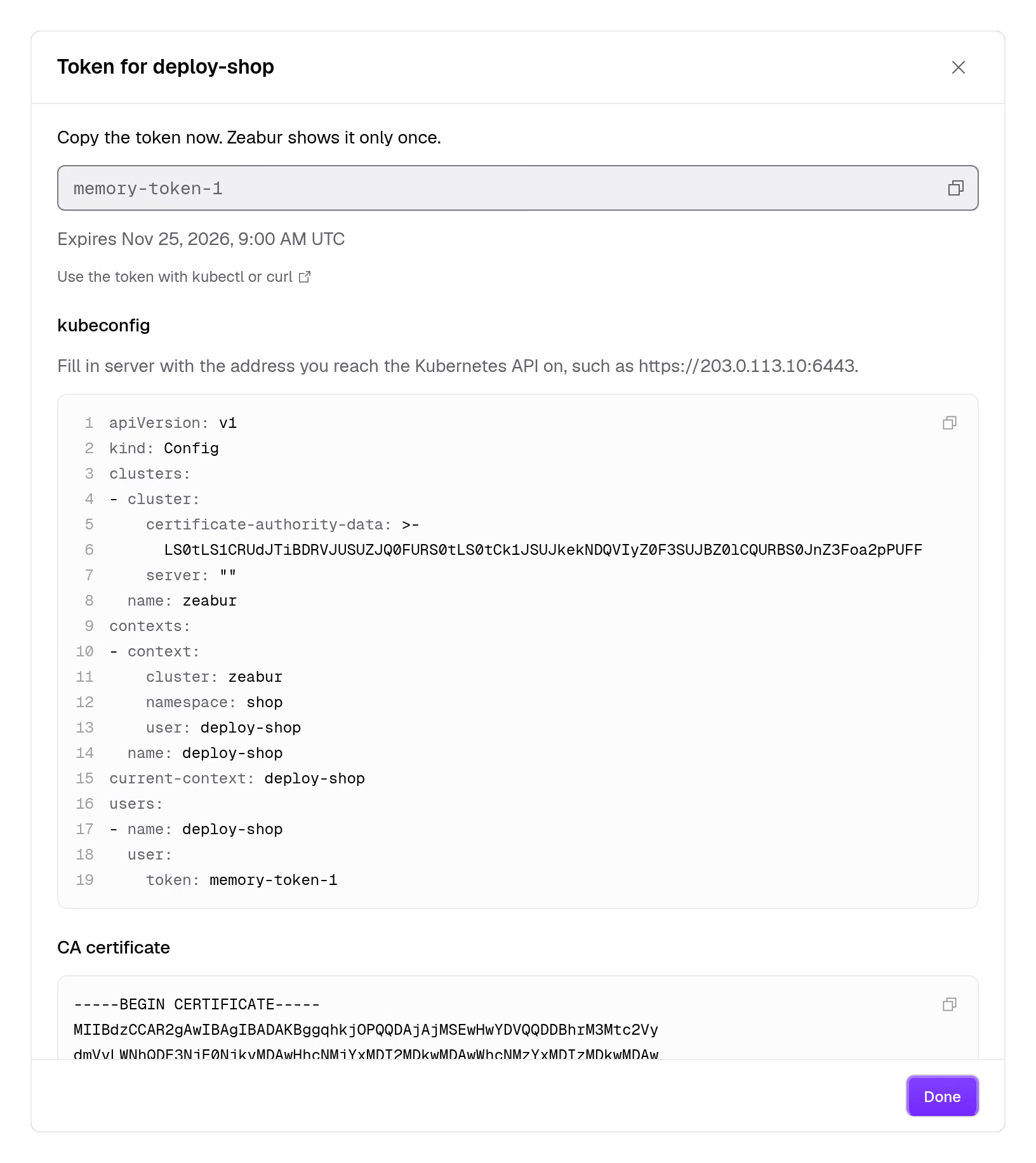
The dialog shows the token, a kubeconfig, and the cluster's CA certificate. Zeabur OSS shows the token only once, so keep the dialog open until you have saved the kubeconfig in the next section.
The list shows each token's roles, who created it, and when it expires. If the cluster limits token lifetimes with --service-account-max-token-expiration, kube-apiserver cuts the token short, and the list shows the real expiry.
Turn the token into a kubeconfig
Section titled “Turn the token into a kubeconfig”The kubeconfig in the dialog already holds the token and the CA certificate. Only server, the API address, is empty: Zeabur OSS knows kube-apiserver only by its address inside the cluster.
Find the API address
Section titled “Find the API address”kube-apiserver listens on TCP 6443 on each server node, for example https://203.0.113.10:6443. On your own computer, print the address your admin kubeconfig uses:
kubectl config view --minify -o jsonpath='{.clusters[0].cluster.server}'If it prints https://127.0.0.1:6443, that kubeconfig runs on the server itself. Use the address you reach the server at instead, such as the address on Zeatend's Access screen. If you reach the API through a domain or another address, add it to tls-san in the K3s or RKE2 configuration file (host.tlsSan with Zeatend), so the certificate covers it.
Save the kubeconfig
Section titled “Save the kubeconfig”Click the copy button on the kubeconfig in the dialog. Paste it into a file, such as deploy-shop.yaml, and make the file readable only by you:
chmod 600 deploy-shop.yamlWhoever has this file can act as the token until it expires.
Fill in the address
Section titled “Fill in the address”kubectl config set-cluster zeabur --server=https://203.0.113.10:6443 --kubeconfig deploy-shop.yamlTry it
Section titled “Try it”export KUBECONFIG=$PWD/deploy-shop.yamlkubectl auth whoamikubectl get deploymentskubectl auth whoami shows system:serviceaccount:zeabur-api-tokens:deploy-shop. That's the name kube-apiserver logs for the token's requests. When the token has a role in only one project, the kubeconfig starts in that project. Otherwise, add -n <project> to each command.
Use it in CI
Section titled “Use it in CI”Store the whole file as a secret of the CI, not in the repository. For GitHub Actions:
gh secret set KUBECONFIG_DATA < deploy-shop.yamlThen write it to a file in the job:
- name: Deploy env: KUBECONFIG_DATA: ${{ secrets.KUBECONFIG_DATA }} run: | export KUBECONFIG="$RUNNER_TEMP/kubeconfig" (umask 077; printf '%s' "$KUBECONFIG_DATA" > "$KUBECONFIG") kubectl set image deployment/web web=ghcr.io/acme/web:${{ github.sha }}The runner must reach the API address on TCP 6443. When the token expires, renew it and store the new kubeconfig again.
Connect with curl
Section titled “Connect with curl”curl needs the API address, the token, and the CA certificate. Copy the CA certificate from the dialog into ca.crt. A token with a role in a project can also read it from the project's kube-root-ca.crt config file:
kubectl -n shop get configmap kube-root-ca.crt -o jsonpath='{.data.ca\.crt}' > ca.crtThen set the address and token once:
APISERVER=https://203.0.113.10:6443TOKEN='<token>'What a token can do
Section titled “What a token can do”A token has only the roles you give it in projects, plus zeabur-member, which lets it read node and namespace names. A Viewer token can see the status of a project's services. A Developer token can also:
- Change a service's image and replicas, and restart it.
- Read and edit secrets, and set variables.
- Read logs and run commands in a replica with
kubectl exec. - Build again.
A token can't:
- Create or delete projects, or touch a project it has no role in.
- Change nodes, cluster components, or cluster backups.
- Read or change anything in
zeabur-api-tokens, so it can't request more tokens.
Never give CI an admin kubeconfig
Section titled “Never give CI an admin kubeconfig”There's no admin token. Admin accounts sign in only with passkeys, and a token with full rights would get around that. It could also create identities of its own, so deleting the token would not take its access away.
For work across the cluster, such as creating projects, installing components, managing nodes, or cluster backups, use your own kubeconfig as an admin. See Admin accounts and regular accounts.
If something outside the cluster must do one admin task on its own, write a small program for that one task. Give it its own ServiceAccount, bind only the verbs and resources that task needs, and make it do nothing else.
Common tasks
Section titled “Common tasks”The examples use the project shop and the service web. A service built from an image or Git is a Deployment, and its container has the same name as the service. A Viewer token can only list services. The other tasks need Developer.
| Task | Method and path |
|---|---|
| List services | GET /apis/apps/v1/namespaces/shop/deployments |
| Read logs | GET /api/v1/namespaces/shop/pods/<replica>/log |
| Restart | PATCH /apis/apps/v1/namespaces/shop/deployments/web |
| Change the image | PATCH /apis/apps/v1/namespaces/shop/deployments/web |
| Set a variable | PATCH /apis/apps/v1/namespaces/shop/deployments/web |
| Build again | PATCH /apis/builder.zeabur.com/v1alpha1/namespaces/shop/builds/web |
| Change replicas | PATCH /apis/apps/v1/namespaces/shop/deployments/web/scale |
List services
Section titled “List services”kubectl get deployments -l app.kubernetes.io/namecurl --cacert ca.crt -H "Authorization: Bearer $TOKEN" \ "$APISERVER/apis/apps/v1/namespaces/shop/deployments?labelSelector=app.kubernetes.io/name"Databases and services with volumes may be StatefulSets. List them at /apis/apps/v1/namespaces/shop/statefulsets.
Read logs
Section titled “Read logs”kubectl logs -l app.kubernetes.io/name=web --tail=100curl reads one replica at a time. Find the replica names, then read one:
curl --cacert ca.crt -H "Authorization: Bearer $TOKEN" \ "$APISERVER/api/v1/namespaces/shop/pods?labelSelector=app.kubernetes.io/name%3Dweb"curl --cacert ca.crt -H "Authorization: Bearer $TOKEN" \ "$APISERVER/api/v1/namespaces/shop/pods/<replica>/log?container=web&tailLines=100"Restart
Section titled “Restart”Like Restart in Zeabur OSS, this sets the pod template annotation kubectl.kubernetes.io/restartedAt to the current time.
kubectl rollout restart deployment/webcurl --cacert ca.crt -H "Authorization: Bearer $TOKEN" -X PATCH \ -H "Content-Type: application/strategic-merge-patch+json" \ -d "{\"spec\":{\"template\":{\"metadata\":{\"annotations\":{\"kubectl.kubernetes.io/restartedAt\":\"$(date -u +%Y-%m-%dT%H:%M:%SZ)\"}}}}}" \ "$APISERVER/apis/apps/v1/namespaces/shop/deployments/web"Change the image
Section titled “Change the image”For a service built from Git, build again instead. Keel sets the image when the build finishes.
kubectl set image deployment/web web=ghcr.io/acme/web:1.5curl --cacert ca.crt -H "Authorization: Bearer $TOKEN" -X PATCH \ -H "Content-Type: application/strategic-merge-patch+json" \ -d '{"spec":{"template":{"spec":{"containers":[{"name":"web","image":"ghcr.io/acme/web:1.5"}]}}}}' \ "$APISERVER/apis/apps/v1/namespaces/shop/deployments/web"Set a variable
Section titled “Set a variable”This changes a variable under Set directly on the service's Variables tab. New replicas start with the new value.
kubectl set env deployment/web -c web LOG_LEVEL=debugcurl --cacert ca.crt -H "Authorization: Bearer $TOKEN" -X PATCH \ -H "Content-Type: application/strategic-merge-patch+json" \ -d '{"spec":{"template":{"spec":{"containers":[{"name":"web","env":[{"name":"LOG_LEVEL","value":"debug"}]}]}}}}' \ "$APISERVER/apis/apps/v1/namespaces/shop/deployments/web"Build again
Section titled “Build again”Like Build again in Zeabur OSS, this sets the builder.zeabur.com/rebuild annotation on the Build. Zeabur Builder builds the branch's latest commit.
kubectl annotate build web --overwrite builder.zeabur.com/rebuild="$(date -u +%Y-%m-%dT%H:%M:%SZ)"curl --cacert ca.crt -H "Authorization: Bearer $TOKEN" -X PATCH \ -H "Content-Type: application/merge-patch+json" \ -d "{\"metadata\":{\"annotations\":{\"builder.zeabur.com/rebuild\":\"$(date -u +%Y-%m-%dT%H:%M:%SZ)\"}}}" \ "$APISERVER/apis/builder.zeabur.com/v1alpha1/namespaces/shop/builds/web"Change replicas
Section titled “Change replicas”kubectl scale deployment/web --replicas=2curl --cacert ca.crt -H "Authorization: Bearer $TOKEN" -X PATCH \ -H "Content-Type: application/merge-patch+json" \ -d '{"spec":{"replicas":2}}' \ "$APISERVER/apis/apps/v1/namespaces/shop/deployments/web/scale"Renew, change, and delete
Section titled “Renew, change, and delete”Choose More → Renew next to a token to get a new token with the same name and access. Tokens issued before keep working until they expire.
Choose More → Change access to give the token roles in other projects. The change applies to every token issued for it.
To stop a token at once, choose More → Delete. Every token issued for it stops working, and requests get 401 Unauthorized.
A token doesn't belong to the person who created it. It keeps working after they leave, until it expires or an admin deletes it.
What Zeabur OSS creates
Section titled “What Zeabur OSS creates”Zeabur OSS writes these objects with the admin's own permissions:
| Object | Contents |
|---|---|
ServiceAccount <name> in the zeabur-api-tokens namespace | Labels zeabur.com/api-token: <name> and app.kubernetes.io/managed-by: zeabur. Annotations record who created it and when the latest token expires |
RoleBinding zeabur-api-token-<name> in each project | Binds zeabur-project-developer or zeabur-project-viewer to the ServiceAccount |
ClusterRoleBinding zeabur-api-token-<name> | Binds zeabur-member, like a member's |
The token itself comes from a TokenRequest for the ServiceAccount. Zeabur OSS doesn't store it in a secret or anywhere else. Deleting the token deletes its bindings and the ServiceAccount.
The chart creates the zeabur-api-tokens namespace, and nothing else runs there. Only admins have permissions in it, so nobody else can request a token or run a pod as one. See API tokens and RBAC.